
Organizations are under increasing pressure to close security gaps faster than ever. Cyber threats are growing more advanced, and identity compromise remains one of the most common attack vectors. As Microsoft continues its Secure Future Initiative (SFI), a new tool has emerged to help organizations identify and address configuration risks across their environments: the Microsoft Zero Trust Assessment.
At RBA, we see this as a valuable advancement for organizations adopting Microsoft 365 or pursuing Zero Trust maturity. The tool provides detailed visibility into tenant configuration, identifies deviations from best practices, and delivers clear remediation guidance, all at no cost.
Why the Zero Trust Assessment Matters
Many organizations understand the value of Zero Trust but struggle to operationalize it. They have policies, controls, and tools in place, but lack the data to confirm whether their configuration truly aligns with best practices.
Microsoft’s new assessment helps bridge that gap. It evaluates your Microsoft 365 tenant, starting with the Identity and Device pillars, and produces an actionable report that explains:
- What controls were checked
- Which ones failed and why
- The associated risk level and user impact
- Step-by-step guidance for remediation
For security and infrastructure teams, it provides something that is often missing; a single source of truth that connects policy intent with actual configuration state.
How the Assessment Works
The Microsoft Zero Trust Assessment is delivered as a PowerShell module that performs a read-only scan of your tenant. Running the tool is straightforward once the prerequisites are met.
Prerequisites
Before running the assessment, make sure you have*:
- PowerShell 7.2 or later installed on your workstation
- Microsoft Graph PowerShell SDK if not already installed
- Network connectivity to Microsoft Graph endpoints
- Sufficient local storage to save the report output
*Subject to change as Microsoft evolves their tooling, etc.
Required Roles and Permissions
The assessment requires read-only access to Microsoft 365 and Entra ID configuration data.
You must sign in with an account that holds one of the following Azure AD roles:
- Global Administrator
- Security Administrator
- Security Reader
- Global Reader
These roles allow the tool to collect configuration data but does not make any changes.
App Consent
When you first connect, the tool will prompt for consent to register and authorize an application in your tenant.
This app is used to read configuration settings through Microsoft Graph.
If admin consent is required in your organization (if it isn’t you should review that!), you must have an administrator approve the app registration before proceeding.
Running the Assessment
Once prerequisites and consent are in place, you can run the tool with the following commands:
Put this in a code box:
Install-Module ZeroTrustAssessment -Scope CurrentUser
Connect-ZtAssessment
Invoke-ZtAssessment
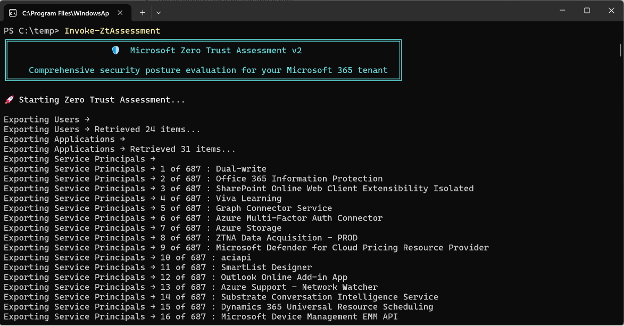
Once complete, the tool generates a local report summarizing results across your environment.

Each test includes:
- The policy or object evaluated
- Risk and implementation details
- Direct links to where changes can be made in the Microsoft 365 admin portals
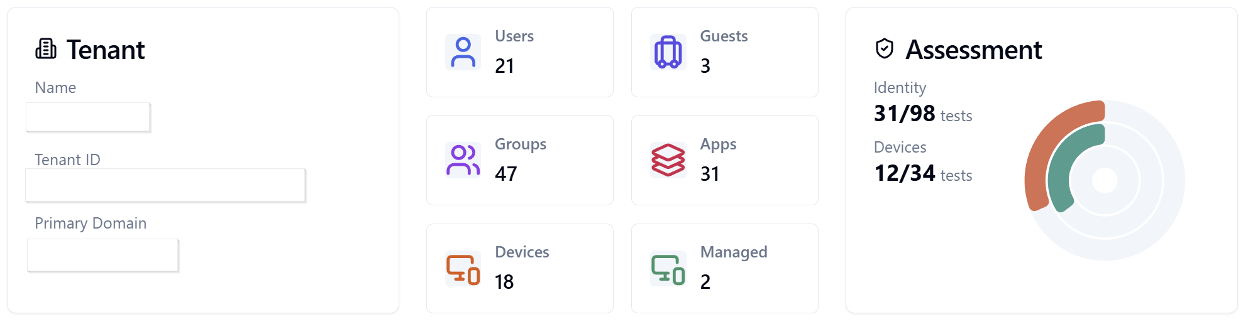
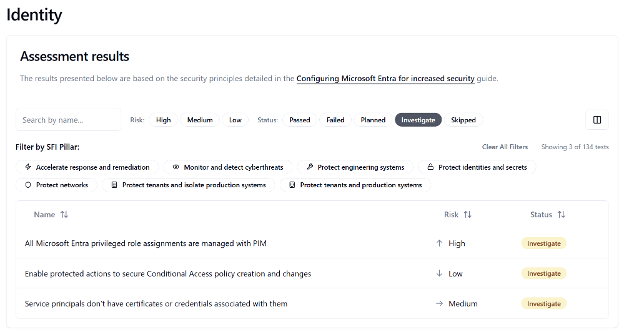
For an example of what the output looks like, Microsoft has provided a sample report.
Actionable, Not Theoretical
The best part of this tool is its focus on clarity. The report explains what failed, why it matters, and how to fix it. Teams can use this to prioritize changes by risk level and implementation effort.
But, as with Microsoft Secure Score and other similar tools, we recommend careful review before applying changes in production. Some recommendations may affect authentication flows, device policies, or downstream integrations. The goal is not to rush to 100 percent compliance; it is to make informed improvements safely.
RBA helps clients interpret these reports, identify high-value remediations, and plan configuration changes that strengthen security without disrupting business operations.
What Makes This Tool Stand Out
Microsoft’s assessment is free, deeply integrated, and aligned directly with frameworks like:
- CISA’s SCuBA Project (Secure Cloud Business Applications)
- NIST Cybersecurity Framework (CSF)
- Microsoft’s Secure Future Initiative (SFI)
This alignment means organizations can trust the results to reflect industry-recognized standards while staying within the Microsoft ecosystem they already manage.
For organizations leveraging Entra ID and Intune today, the Zero Trust Assessment provides a strong foundation for validating Identity and Device configurations. Future updates are expected to extend this visibility into additional areas such as Defender, Purview, and network controls.
When to Use It
The Zero Trust Assessment is most valuable when:
- Establishing a baseline before a security review or audit
- Validating configuration after a major change (for example, Intune or Conditional Access updates)
- Prioritizing roadmap activities for Zero Trust maturity
- Demonstrating measurable security progress to leadership or regulators
At RBA, we incorporate tools like this into our Zero Trust workshops and operational reviews. They provide hard data that helps our clients move from conceptual discussions to tangible improvement plans.
The RBA Perspective
Microsoft’s continued investment in Zero Trust enablement reflects an important shift; security visibility is now table stakes. Tools like the Zero Trust Assessment turn that visibility into something operational, clear, specific, and actionable.
For organizations already invested in Microsoft 365, this tool helps close the gap between configuration and intent. It is also an opportunity to embed continuous improvement into the security lifecycle.
As future updates expand coverage beyond Identity and Device to include Applications, Network, and Data, the assessment will evolve into one of the most complete baselining tools in Microsoft’s ecosystem.
Get Started
You can download and run the Microsoft Zero Trust Assessment today at aka.ms/zerotrust/demo.
If you need help interpreting the results or integrating them into your broader Zero Trust program, RBA can assist with:
- Configuration Baseline Reviews
- Remediation Planning Workshops
- Zero Trust Roadmaps and Governance Models
Our goal is to help organizations move beyond reactive patching and establish a measurable, operational approach to Zero Trust.
About the Author

Cody Billings
Senior Principal
With nearly 30 years of experience in IT, I specialize in applying technology to solve complex business challenges; balancing strategy with execution to drive meaningful outcomes. Having worked on both the client and consulting sides, I bring a unique perspective on what makes technology initiatives successful.
I focus on cloud security, identity management, governance strategy, and infrastructure architecture, helping organizations modernize securely while navigating mergers, acquisitions, and digital transformations. My expertise lies in designing scalable solutions that align with business objectives, ensuring security, compliance, and operational efficiency.
As a Senior Principal Consultant and Partner at RBA, I lead security and governance initiatives, leveraging Microsoft 365, Zero Trust principles, and cloud-first strategies to enhance resilience and agility. I take pride in mentoring teams, refining security postures, and enabling organizations to make informed decisions about their technology investments.